

The enhanced data model has now been GA for a while and I know for all my new projects, we are using by default the enhanced data model. However, there are many “legacy” portals still using the standard data. Microsoft has recently (finally) released a tool to migrate the website metadata from a standard to an enhanced data model.
Here is a video where I walk through the process to migrate a website from the standard to the enhanced data model.
Standard data model, Enhanced data model, what does it all mean?
Since the folks at Adxstudio decided to build a website management system on top of Dynamics CRM, the website metadata (the configuraiton data that describes web pages, templates, snippets, etc) has been stored as regular records in Dataverse. The meant that an entire website could be configured using a model-driven Power App!
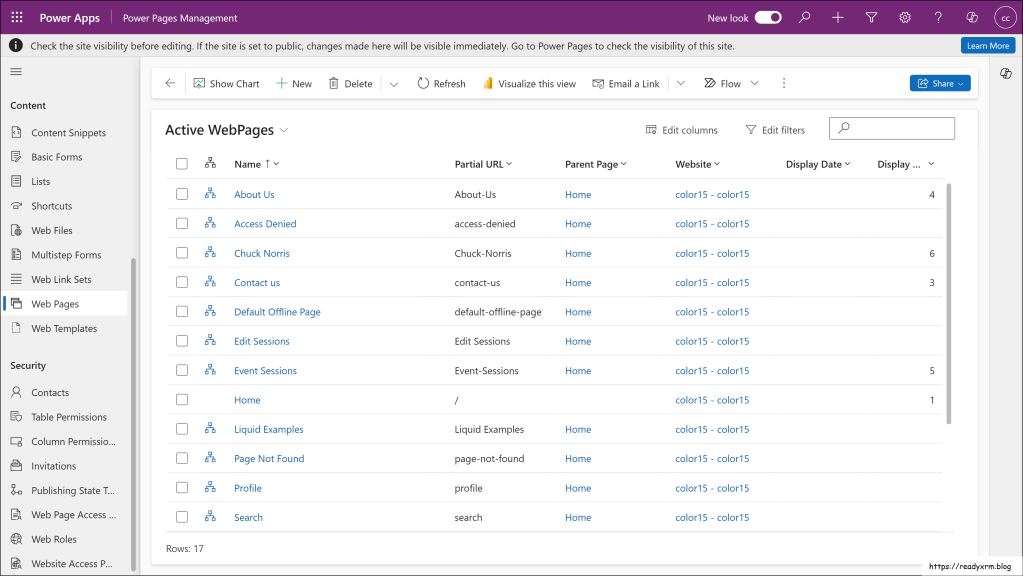
While this provided great flexibility, this also presented a few challenges.
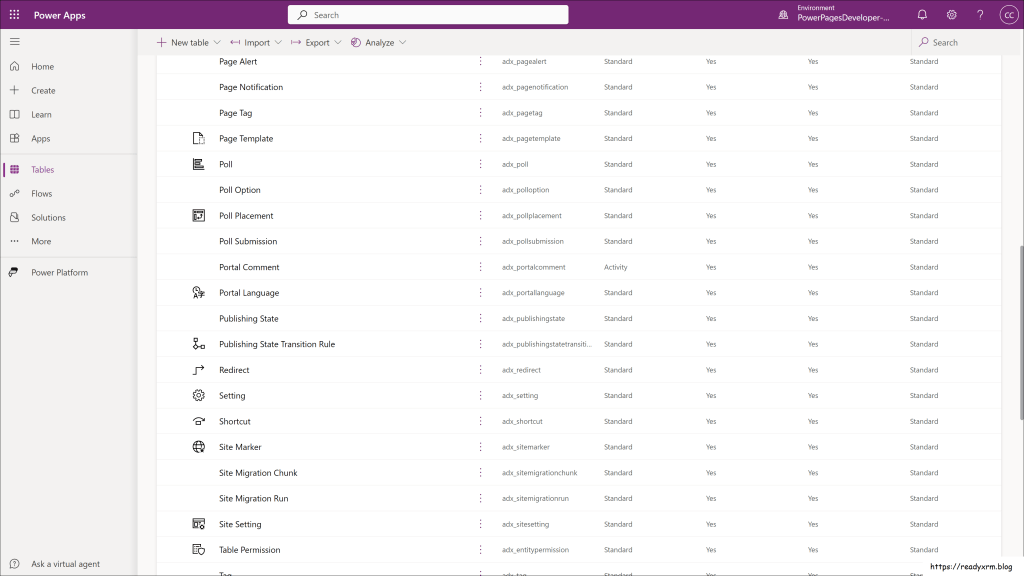
The tables, plug-ins, features used to define portal and portal templates all needed to be loaded as a series of managed solutions. Not a problem, really, but added a lengthy process to install a new website and added a lot of extra overhead to a Dataverse instance. Updates and enhancements to these solutions need to be applied manually.

Along with the solutions meant a lot of extra custom tables to store the various metadata. Again, adding a lot of overhead.
This also meant that to move a website, you had to move the data with the data configuration migration tool, the XrmToolBox portal records mover, or downloading/uploading using the PAC CLI. This meant extra steps and work to the ALM process.

The enhanced data model changes all of this. All the configuraiton is now stored as JSON data in three core tables that are now default with Dataverse. This means that every new Dataverse instance is ready to host Power Pages websites. This also means that Microsoft can run updates and enhancements during regular maintenance processes and doesn’t need to rely on Power Platform admins to make those manual updates. You can still view the data in the Power Pages management app or other methods as the data is also surfaced as virtual tables.
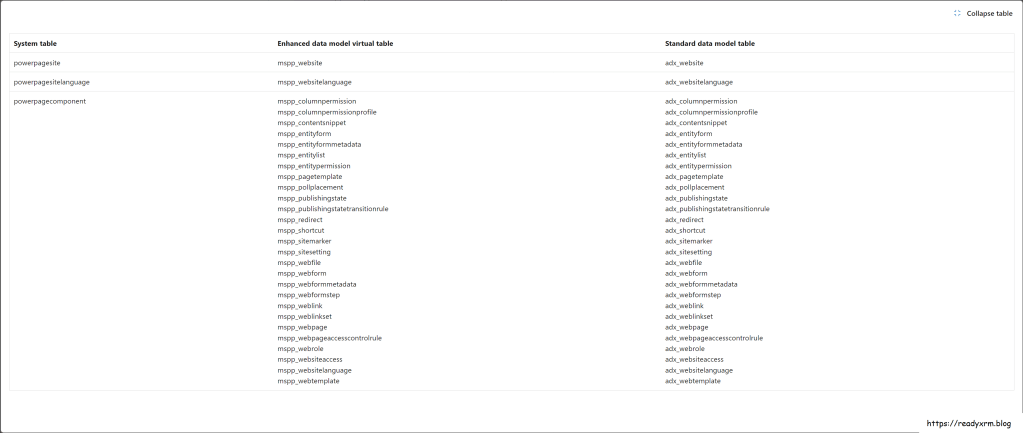
The enhanced data model also means that websites can be added to solutions and transported along with the other Power Apps, Power Automate, and copilot configurations.
Microsoft has provided a tool and the steps to migrate a Power Pages website using the standard data model to the enhanced data model. See Migrate standard data model sites to enhanced data model (preview)
You can also watch the video above to see the process in action.
Summary
The ability to migrate a website from the standard data model to an enhanced data model is a welcome udpate from Microsoft and a way to modernize how websites are built and maintained in a way that is consistent with the rest of the Power Platform.
Nick Doelman is blue-haired Microsoft MVP, podcaster, trainer, public speaker, competitive Powerlifter and really a decent guy. Follow Nick on X at @readyxrm or LinkedIN. Listen or watch the the Power Platofrm Boost podcast every second week for news and updates from the Power Platform community.


 The ReadyXRM Blog by Nick Doelman
Hi Nick,
While trying above steps I encounter with an error as below:-
“Error: Dataverse Base Package is not on the latest version to migrate. To update the package, visit https://aka.ms/PPACMigration aborted.”
Thanks in advance !!!
LikeLike
I think you need to update your Power Pages managed solutions. Follow the steps from MS Learn: https://learn.microsoft.com/power-pages/admin/update-solution
that should sort it out.
LikeLike
Tried it says “No portal package(s) available for upgrade.”
LikeLike
Another thing to try is go to the Power Platform Admin Center -> choose the environment -> resources -> select Dynamics 365 apps -> find “Power Pages Core” and see if there is an update available (and update it)
LikeLike
Found any solution for the issue??
LikeLike
Hi Nick,
I am getting the same error as well
Error: Dataverse Base Package is not on the latest version to migrate. To update the package, visit https://aka.ms/PPAC
Migration aborted.
All the packages are in latest version
LikeLike
Curious, what is your database version? (PPAC -> select environment -> there is box that says “version” and my database version says “9.2.24071.168”. The admin center says they are currently rolling out version 9.2.24072.00000. Is yours lower? The new enhanced model is dependent on core Dataverse updates as the new metadata tables are there by default. I am not sure if this upgrade can be “enforced” or you need to wait it out, unfortunately. I might also suggest opening a ticket, despite the tool being in preview, the team said they will provide support.
LikeLike
Got any solution for this issue??
LikeLike
Hi Nick,
I am getting the same error as well
Error: Dataverse Base Package is not on the latest version to migrate. To update the package, visit https://aka.ms/PPAC
Migration aborted. All the packages are in updated already.
Thanks in advance !!!
LikeLike
I’m running into the same issue “Error: Dataverse Base Package is not on the latest version to migrate.” and I think this might be a potential bug on the pac cli.
Prerequisites section of the migration mentions that “Dataverse Base Portal Package” needs to be 9.3.2307.x, I currently have version 9.2.2209.x with no option to update, I think this might be because the Dataverse Base Portal Package is pretty much deprecated and the new one should be the Power Pages Core. I had a look at the Dataverse Base Package solution and it was empty, no components. My guess is that if you haven’t updated this solution to 9.3.2307.x before it was made unavailable you won’t be able to migrate the portal until the pac cli removes it as a dependency for the upgrade.
Unless I’m completely wrong and there’s another reason for this error!
I’ve tried tricking the tool by deleting the Dataverse Base Portal solution from the environment (it had 0 components in it) and that also didn’t work.
LikeLike
If I look at one of my sites, I see that it is trying to update to version 9.3.2408.143 (currently on 9.3.2408.141). If it is not giving you an option to update, then I highly suggest you open a support ticket to get the latest packages installed by support.
LikeLike